Build Insights and SBOMs
Tracking the Build Content
Validating Builds with an SBOM

The Software Bill of Material (SBOM) report is one of the best ways to validate the security of your binaries, that your probably not using. An SBOM is a ’nested’ list of all of the artifacts that were used in a single build. Without an SBOM it is difficult to guarantee matching source to executables, or even know what source was used to create an executable. SBOMs are a work product of the build itself and should be created for every build executed. SBOMs can report on ’local’ code and ’transitive’ dependencies. Artifact scanning software provides insights on your transitive dependencies. Your build process must also include the audit of all in-house code that is used in your build.
For most organizations an SBOM is created using scanning tools and a listing from the version control system showing what was pulled into the local build directory at build time. While this is a good start it can miss critical details. First, it cannot show files that may have been referenced outside of the local build directory and not managed in your versioning system. Think compiler libraries for example. In addition, SBOMs generally do not report on build variable settings such as the value for CLASSPATH, VPATH, LIBPATH, or INCLUDE_PATH. This level of information is equally important as knowing the local source code and transitive dependencies. When building software, files and artifacts come from many places. Missing them in the SBOM report can give the impression that they were not used, even when they were.
Meister Build Audits
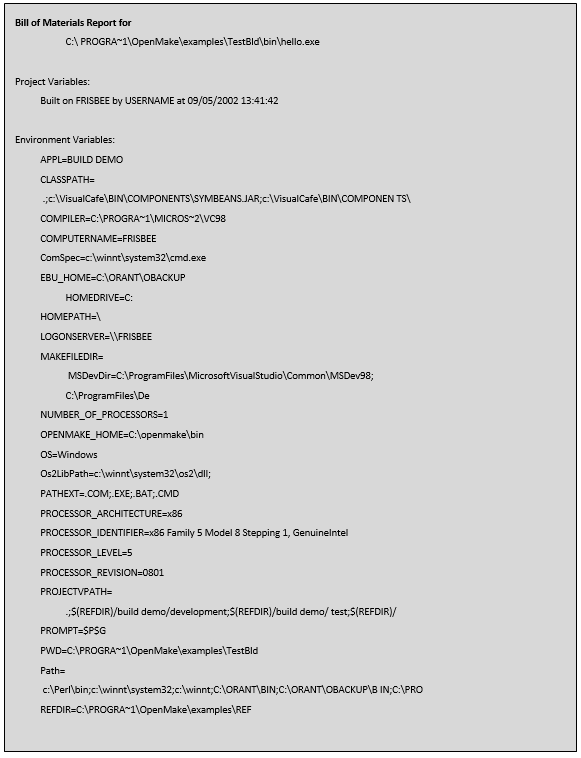
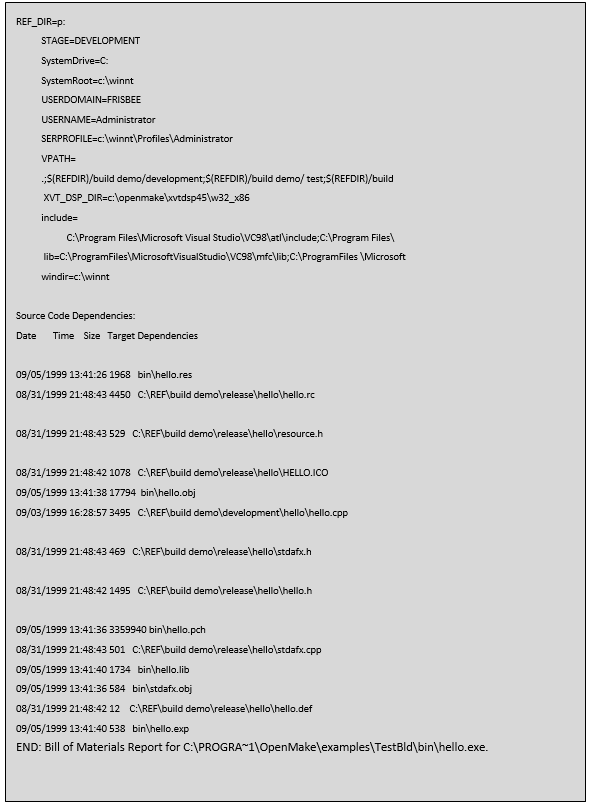
Meister extends the concept of SBOMs to include all forensic insights about a build called a Build Audit Report. The Build Audit Report includes your nested source listing and all variable information that was used in the build including compiler level details. Meister’s Build Audit Report allows you to recreate the build by reporting on the entire build configuration, not just the source code. Meister Build Audit Reports include:
- Source code information including the directory the file was found in and the files size, date and timestamp. If a versioning tool is in place, Meister can retrieve and report on the source version information allowing the user to trace the actual version of the source back to the versioning tool. Meister performs this activity through the real-time dependency scanning. As the build executes and dependencies are located, Meister saves the information for reporting purposes.
- A list of the machine specific environment variables set during the build which includes:
- User Name
- Machine ID
- Compiler Path Settings
- Meister Project and Dependency Directory Settings
- All environment variable “set” at the time of the build.
Meister Footprint
A Footprint is the process of embedding the Meister Build Audit information into the binary itself. If the information is embedded into the built object, it can be retrieved using the Meister “omident” program. Meister’s Footprinting feature allows you to keep the Build Audit report with the binary making it quick to retrieve the SBOM information.
Example Build Audit Report
Conclusion
The use of a SBOM is essential for validating the security of your binary objects. A standard SBOM shows your source code and ’nested’ dependencies based on 1) the source code in your local build directory, plus 2) the transitive dependencies found using scanning technology (open source). Meister’s Build Audit Report expands the concept of the SBOM to include any file touched by the compiler/linker, even when the file is not in your local build directory or in your source code repository. In addition, it adds variable information, compiler details and all build configuration forensics needed to fully examine, debug or re-create the build. With Meister you can embed the Build Audit Report into the binary, called a Footprint, so your binary includes the SBOM for quick retrieval using the Meister ‘omident’ tool.
SBOMs are a critical piece of the security puzzle and should not be overlooked if your goal is to validate all objects used in your build process.
Read more about Meister on our Blogs.